Relay to and from other casters
Usually a caster receives the stream from a base that connects to it and passes it to the rovers. The relay widens this loop in two directions:
- Incoming relay — in the diagram on the presentation page this is the Relay IN: a mount point takes its stream from another NTRIP caster and serves it to your rovers as if it came from one of your bases. In the panel it is the Relay from an external caster section.
- Outgoing relay — the Relay OUT: the stream arriving on one of your mount points is sent on to another NTRIP caster, which receives it as if it came from a base. In the panel it is the Forward to an external caster section.
Both are configured at the bottom of the mount point detail page, and a mount can have both at once: take the stream from one caster and give it to another.
Not the apps' relay
In the Android and iPhone apps the «relay» is the phone that carries the receiver's corrections to the caster over Bluetooth. This page is about something else: casters passing the stream to each other, with no phones in between.
Why do it
An RTK base is a receiver standing still on a point, with its antenna, its power and its connection. Moving it, doubling it or reconfiguring it means going on site. The relay moves streams instead of devices, and this solves many everyday cases.
- Use someone else's base without touching the rovers. A network, a colleague or a customer already has a base where you need to work. With the incoming relay that base becomes one of your mount points: the rovers connect to LiveRTK with their usual credentials and receive that stream, while you see it on the map, record it in RINEX and get the alerts if it stops. If the base changes tomorrow, you change the address in the relay and the rovers do not notice.
- Have a backup when your base drops. In Backup of the base mode the relay stays idle as long as your base is transmitting and takes its place when it stops: power cut, modem without signal, receiver restarted. The rovers stay connected and keep receiving corrections; when your base comes back, it takes its place back on its own.
- Take corrections from a virtual station network. Some networks build a virtual station close to whoever asks for it, and to do so they want a position (a GGA sentence). The relay sends a fixed one, from the point you choose: the network builds the station there, and all your rovers in the area receive it from a single mount point, with a single connection to the network.
- Give your base to another network or to a customer without opening your caster to them. With the outgoing relay your stream arrives on their caster, where their rovers use it with their rules and their accounts. They do not enter your panel, and you do not have to create accounts for people you do not manage.
- One receiver, two casters. The base connects to LiveRTK once only, and forwarding sends a copy to the other caster. There is no need to configure the receiver for two destinations, nor a second device on the same point.
- Change service without going back to the field. Do your bases transmit to another caster today? With the incoming relay you bring them onto LiveRTK leaving them as they are, try rovers, map and recordings at your own pace, and reconfigure the bases only when you pass by. The other way round, with the outgoing relay the previous caster keeps receiving while the rovers move to LiveRTK a few at a time.
- Act as a bridge. The same mount point can take from one caster and give to another: a network's base reaches a customer's caster passing through you, so you monitor it, record it and see when it stops.
Incoming relay

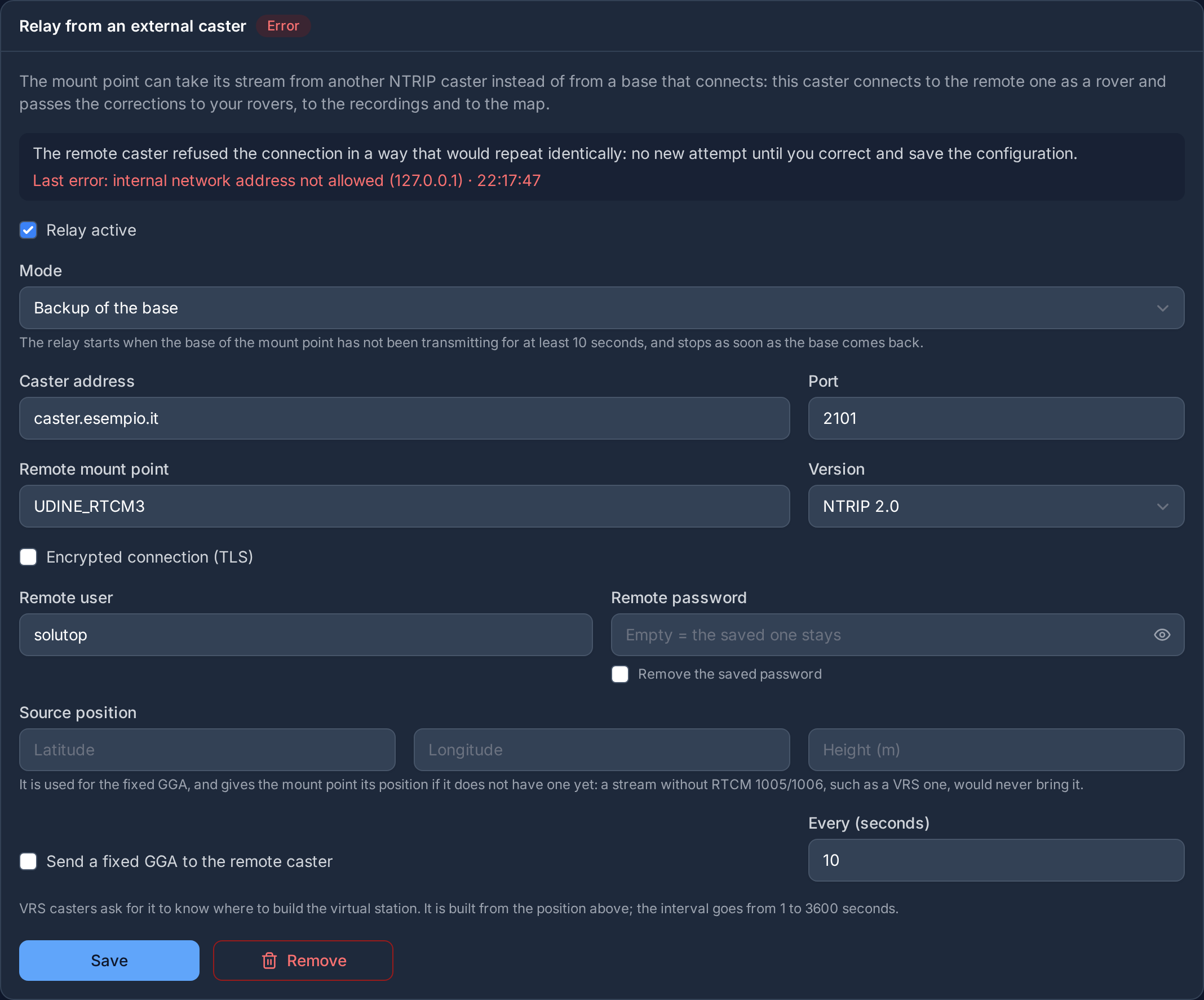
LiveRTK connects to the remote caster as a rover would, asks for the remote mount and puts what it receives into your mount point along the same path as a base that connects. That is why everything else works with no difference: rovers, map, RINEX recordings, weak stream check, alerts and nearest base. In the list and on the mount page the source reads Relay.
What you need:
- a mount point on LiveRTK to receive the stream, even a freshly created one. Its name can differ from the remote one: the rovers use yours;
- the address, port and mount name on the remote caster, plus user and password if that caster asks for them;
- you do not need the source password of your mount point: the relay is born inside the caster, from a configuration that only whoever manages the mount can write.
The section appears only for whoever manages the mount point, that is the owner and the administrator: someone who only has it shared does not see it, because it contains the address and the user of someone else's service.
Setting it up step by step
- Open Mount Points and then the mount point that must receive the stream.
- At the bottom of the page, in the Relay from an external caster section, press Configure the relay.
- Choose the Mode: Main source or Backup of the base (see below).
- Enter address, port and mount of the remote caster, the NTRIP version and the credentials.
- If the remote caster wants to know where you are, enter the source position and turn on the fixed GGA.
- Press Save. The relay starts straight away, and the state above the form tells you how it went.
To stop it without losing the configuration, just turn off Relay active and save. To remove it completely there is Remove, which asks for confirmation: the mount point stops taking the stream from the external caster, and if the relay was transmitting the connected rovers are left without corrections until a base connects.
| Field | What to enter |
|---|---|
| Relay active | Off, the relay does not connect; the configuration stays |
| Mode | Main source or Backup of the base |
| Caster address and Port | The remote caster, for example caster.example.com and 2101 (the suggested port) |
| Remote mount point | The mount to take the stream from |
| Version | NTRIP 2.0 (suggested) or 1.0, whichever the remote caster accepts |
| Encrypted connection (TLS) | Only if the remote caster offers it on that port |
| Remote user and Remote password | The credentials on the remote caster, the ones you would give a rover. The user name cannot contain a colon. The password is never read back: an empty field leaves it as it is, and Remove the saved password deletes it |
| Source position | Latitude, longitude and height (in metres): used for the fixed GGA, and they give the mount point its position if it does not have one yet. Latitude and longitude go together |
| Send a fixed GGA to the remote caster and Every (seconds) | For virtual station networks. Interval from 1 to 3600 seconds, 10 if you do not change it |
Main source or backup
- Main source: the relay is the source of the mount point, always. A base that tries to connect from another address while the relay is transmitting is refused, as happens between two bases. It also works the other way: if a base is already transmitting on the mount, the relay is refused (this caster refused the source) and retries later.
- Backup of the base: the mount has its own base, and the relay steps in only when the base is missing, that is when it has not been transmitting for at least 10 seconds — closed, dropped, or silent for half a minute. The ten seconds keep the rovers from jumping from one source to the other and back for a base that reconnects right away. As soon as the base connects again it takes its place back — the caster lets it in even while the relay is transmitting — and the relay goes back to waiting, without anyone having to touch anything. The rovers stay connected the whole time: only where the corrections come from changes.
Alerts with the backup
As long as the backup covers the base, the mount point does not go offline: the base-down alert is not sent, because the rovers keep receiving. The switch to the backup and the return of the base are written in the logs.
Choosing the backup
During the backup the rovers work on the remote base, not on yours: their coordinates depend on it. A nearby base is best, with coordinates in the same reference system as yours.
NTRIP 1.0 or 2.0
The relay speaks both versions, and you choose the one the remote caster accepts:
- NTRIP 2.0: the request is HTTP/1.1; if the fixed GGA is on, the first position already goes out in the request and the others follow at the chosen interval.
- NTRIP 1.0: the request is the older form, which every caster understands; the first GGA goes out as soon as the remote caster has answered.
In both versions user and password travel in the request. If the remote caster answers in a way the relay does not recognise (invalid answer from the remote caster), try the other version.
The fixed GGA
Virtual station networks send nothing until they know where the requester is. A rover says so with its position; the relay, which does not move, always sends the same one, built from the source position: single quality, twelve satellites, HDOP 1 — plausible values, because some casters discard a GGA without a fix — and the height in the altitude field. Without latitude and longitude the fixed GGA cannot be turned on: saving refuses it.
Below the state you can read how many GGA sentences have gone out and the time of the last one. For a caster serving a real base the GGA is not needed: leave it off.
The same position is also used by the map: a stream that does not carry the base coordinates (RTCM messages 1005/1006), like that of a virtual station, would never give the mount point a position. If the mount does not have one yet, it takes the one written here; a position already known, or set by hand, is not touched.
The states
Above the form you read the relay state, refreshed every three seconds:
| State | What it means |
|---|---|
| Disabled | The relay is off, or the mount point is suspended |
| Connecting | Connecting to the remote caster |
| Transmitting | The stream arrives and goes to the rovers |
| Retrying | The connection failed or was interrupted: it retries on its own after 5 seconds, then 10, 20, 40, and then every minute. Below you can read how long until the next one |
| Error | A refusal that would repeat identically: no new attempt until you correct and save the configuration |
| Waiting | The relay is a backup and the base of the mount is transmitting |
The errors that lead to Error are three: the remote caster refused user or password, the address is on the internal network and the mount belongs to a client (see below), or the saved password can no longer be read. All the others — caster unreachable, remote mount stopped, connection dropped — go through Retrying, because they can sort themselves out. As soon as the stream is arriving again, the next drop starts again from 5 seconds.
The remote caster has 15 seconds to answer; beyond that, the attempt counts as failed. Saving the configuration restarts the relay from scratch, and the previous error is cleared.
Below the state there is the last error, with its time:
| Last error | What happened |
|---|---|
| user or password refused by the remote caster | Wrong credentials, or not enabled on that mount |
| the remote mount point does not exist or is not transmitting | The name is not on the remote caster, or its base is stopped |
| remote caster not reachable | Wrong address, closed port, no network |
| TLS connection failed | TLS on for a port that does not offer it, or certificate not valid for that name |
| the remote caster did not answer in time | No answer within 15 seconds |
| invalid answer from the remote caster | A port that does not belong to an NTRIP caster, or the wrong version |
| the remote caster closed the connection | The remote caster interrupted the stream |
| this caster refused the source | LiveRTK did not accept the stream on the mount, for example because a base is already transmitting on it |
| internal network address not allowed | See «Security» below |
| the saved password can no longer be read: write it again | See «Security» below |
Security
- The configuration is seen and changed only by whoever manages the mount point.
- The remote password is stored encrypted — a hash is not enough, because it must be sent on to the remote caster — and never comes back from the server: the panel only says whether there is one. The encryption key is tied to the server configuration: if that key changes, the relay says so (the saved password can no longer be read) and the password must be written again.
- On the mount points of a client the relay does not connect to internal network addresses (loopback, private networks, link-local, Tailscale): the state becomes Error. All the addresses the name resolves to are checked, and the connection goes to one of exactly those. On an administrator's mounts the internal network is allowed.
- If the caster name has both an IPv4 and an IPv6 address, the relay uses the IPv4 one.
Outgoing relay


It is the opposite of the incoming relay: the stream arriving on the mount point — from the base, the app or an incoming relay — is sent on to another NTRIP caster, presenting itself there as a base. Rovers connected to LiveRTK are not affected.
What you need:
- on the remote caster, a mount point already created and free, to transmit on;
- the source credentials on that caster: the password only in NTRIP 1.0, user and password in NTRIP 2.0. They are the ones you would put in a base, not those of a rover.
This section, too, is shown only to whoever manages the mount point.
Setting it up step by step
- Open Mount Points and then the mount point to forward.
- At the bottom of the page, in the Forward to an external caster section, press Set up forwarding.
- Enter address, port and mount of the remote caster, the NTRIP version and the credentials.
- Press Save. If the mount point is receiving a stream, forwarding starts straight away; otherwise it waits.
Turning off Forwarding on stops forwarding and keeps the configuration. Remove, with its confirmation, deletes it: the remote caster stops receiving this mount point's stream, and rovers connected to LiveRTK are not affected.
| Field | What to enter |
|---|---|
| Forwarding on | When off, nothing is forwarded; the configuration is kept |
| Caster address and Port | The caster that must receive the stream (suggested port 2101) |
| Remote mount point | The mount to transmit on, already created on the remote caster |
| Version | NTRIP 1.0 (suggested: the base identifies itself with the password only, and the user field is disabled) or 2.0 (user and password) |
| Encrypted connection (TLS) | Only if the remote caster offers it on that port |
| Remote user and Remote password | The source credentials on the remote caster. The password contains no spaces and is never read back: an empty field leaves it as it is, and Remove the saved password deletes it |
When it starts and when it stops
Forwarding starts on its own when the mount point receives a stream and closes when the stream stops: a connection left open without data would make the remote caster believe the base is there. There is nothing to switch on by hand every morning: when the base comes back, forwarding comes back too.
- In NTRIP 1.0 it presents itself with the
SOURCEline and the password, then sends the stream. - In NTRIP 2.0 it presents itself with user and password and sends the stream in chunks, as that version requires.
The stream goes out as it is, unchanged: the remote caster receives what your rovers receive.
The states
| State | What it means |
|---|---|
| Off | Forwarding is off, or the mount point is suspended |
| Waiting | The mount point is not receiving a stream: forwarding starts as soon as it arrives |
| Connecting | Connecting to the remote caster |
| Forwarding | The stream reaches the remote caster; below you can read how much has been sent |
| Retrying | The connection failed or dropped: it retries after 5 seconds, then twice as long, up to one minute |
| Error | The remote caster refused the password, the address is on the internal network for a client's mount, or the saved password can no longer be read: no new attempts until you correct and save |
If the remote mount point is taken by another source, or does not exist, forwarding reports it among the errors and retries. If the remote caster does not receive fast enough and data piles up (over one megabyte in the queue), forwarding closes and reconnects, instead of sending older and older corrections. Here too the remote caster has 15 seconds to answer, and when forwarding connects it writes so in the logs.
Security
The same rules as for the incoming relay apply: configuration visible only to whoever manages the mount point, encrypted password that never comes back, no internal network on a client's mounts, IPv4 preferred.
Incoming and outgoing compared
| Incoming relay | Outgoing relay | |
|---|---|---|
| In the presentation diagram | Relay IN | Relay OUT |
| Section in the panel | Relay from an external caster | Forward to an external caster |
| The stream goes | from the remote caster to your mount point | from your mount point to the remote caster |
| LiveRTK presents itself as | a rover | a base |
| Credentials | those of a rover on the remote caster | those of a source on the remote caster |
| It connects | always, or only when your base is missing (backup) | only when the mount point receives a stream |
| Suggested version | NTRIP 2.0 | NTRIP 1.0 |
| Fixed GGA | yes, optional | no |
| The remote mount must | exist and be transmitting | exist and be free |
| State while working | Transmitting | Forwarding |
| New attempts | 5, 10, 20, 40 seconds, then every minute | 5, 10, 20, 40 seconds, then every minute |
| Who configures it | the owner of the mount point or an administrator | the owner of the mount point or an administrator |
Common problems
The relay stays on Error. Read the last error. With refused credentials or an unreadable password, write user and password again and save: until you save the relay does not retry, because the refusal would repeat identically. With internal network address not allowed the mount belongs to a client and points to an internal address: you need a public address, or an administrator.
The relay goes from Connecting to Retrying endlessly. The remote caster is not reachable or does not answer within 15 seconds: check address and port, and that the remote caster's network accepts connections from outside. With invalid answer try the other NTRIP version; with TLS connection failed turn TLS off, or check that the port really offers it.
«The remote mount point does not exist or is not transmitting». Check the name of the remote mount and that its base is on. The relay retries on its own and starts again as soon as the remote base is back.
A virtual station network sends nothing. Turn on Send a fixed GGA to the remote caster and enter the source position in the area where the rovers work.
In Main source the relay is refused. A base is already transmitting on the mount from another address (this caster refused the source). Turn that base off, or switch the relay to Backup of the base if the base must remain the first choice.
The backup does not start. It starts only when the mount's base has not been transmitting for at least 10 seconds, and does not start at all if the relay is off or the mount point is suspended. A base that is connected but silent counts as missing only after half a minute of silence.
The relay's mount does not appear on the map. The remote stream does not carry the base coordinates: enter the source position in the relay and save.
Forwarding stays on Waiting. The mount point is not receiving anything: forwarding starts only with a live source. Check that the base, the app or the incoming relay are transmitting.
Forwarding says the remote mount is taken or does not exist. On the remote caster the mount must be created first, and no other source must be connected to it. Forwarding retries on its own.
Forwarding says the remote caster is not receiving fast enough. The line to the remote caster cannot keep up with the stream: forwarding reconnects on its own. If it happens often, the problem is the network between the two casters.