Alerts
LiveRTK writes to you when something happens that you would not see sitting in front of the screen. Every message arrives in the language chosen by whoever receives it, and everyone decides for themselves which channel to receive it on and which alerts they care about: nobody else touches a user's choices, not even the administrator.

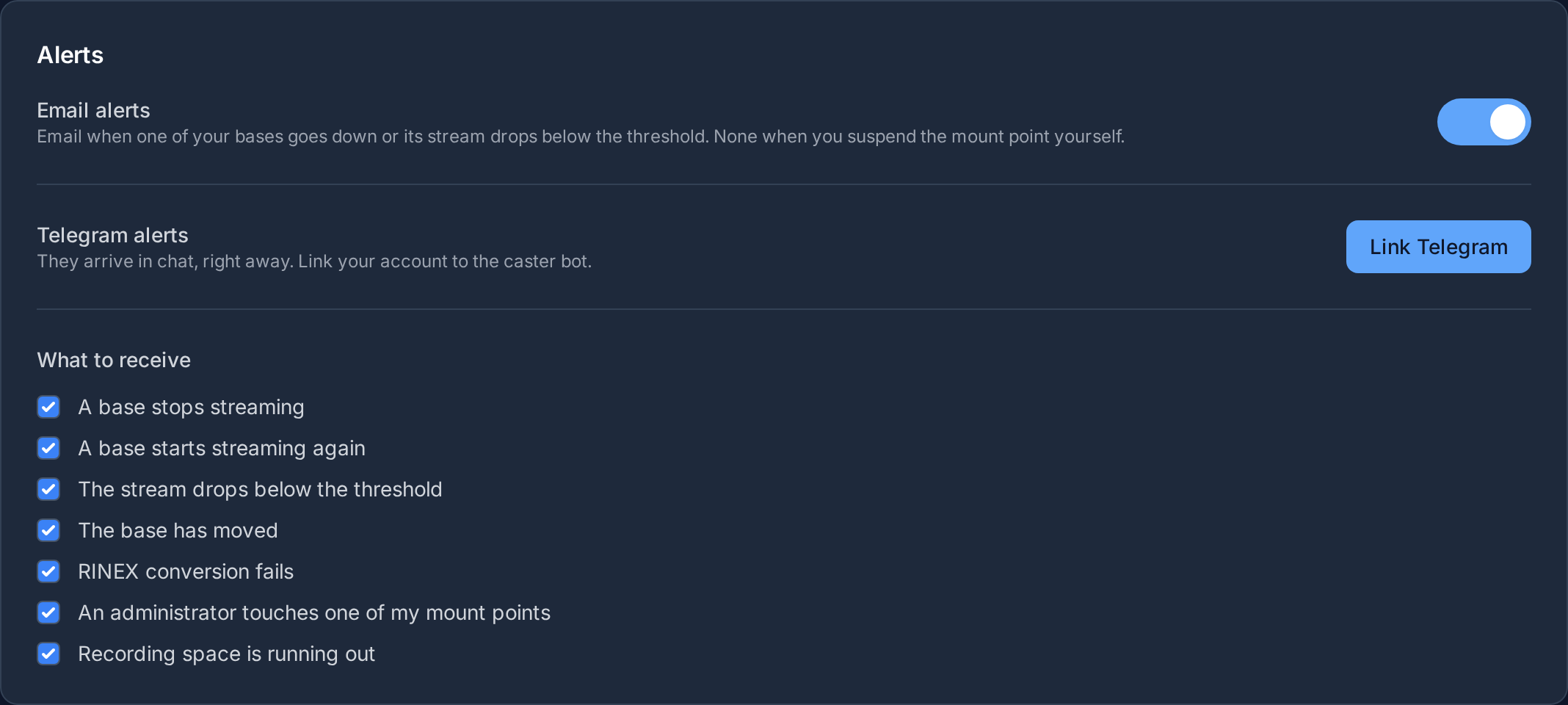
The two channels
| Channel | How to turn it on |
|---|---|
| The Email switch in the settings, Alerts section. It needs a verified address in your profile | |
| Telegram | The Telegram switch in the same section, once the account is linked (below) |
You can keep both on, only one, or neither.
Linking Telegram
The bot is a single one, the caster's: you do not need to create your own.
- In the settings, Alerts section, press Link Telegram.
- A code and a link to the bot appear. Opening the link from your phone starts the
conversation with the right code already in place; otherwise look the bot up and send
it
/collega CODE. - As soon as the bot answers, the page notices by itself and shows Account linked.
The code lasts ten minutes and works once. From the bot you can also use /stato,
which says who the conversation is linked to, and /scollega.
Changing phone
The link lives on the Telegram account, not on the phone: it keeps working on a new device. If you change Telegram account, press Unlink and do it again.
What you can receive
In the Alerts section every entry switches on and off on its own, and applies to all the channels that are on.
| Alert | When it arrives |
|---|---|
| Base offline | The source drops and the mount point has Notify when offline |
| Base back online | The same base starts streaming again |
| Weak stream | The stream stays below the threshold for three checks in a row, and the mount point has Notify when offline: that switch governs every stream alert, not only the drop |
| Base moved | The coordinates in RTCM message 1005 change by more than one metre, and the mount point has Notify when offline: as with the weak stream, with that off this one does not arrive either. It does not arrive for bases with coordinates entered by hand: there the position is your own declaration, and the caster does not question it |
| RINEX conversion failed | convbin could not convert a recording |
| Mount point touched by the administrator | An administrator suspends, reactivates or deletes one of your mount points |
| Space almost full | Your recordings go past 90% of the available space |
If you are the one suspending a mount point, nobody writes to you
Alerts are for what happens without you knowing. A suspension you make yourself, from the mount point page, sends nothing to anyone; a suspension made by an administrator on a mount point of yours does.
Base offline
When the source drops, a message goes to the owner and to the administrator, and a second one when the base comes back. A micro-outage sets nothing off: sending waits a few dozen seconds, so a receiver restart does not fill your inbox.
Suspended mount points send no alerts: a stream that is stopped because you stopped it is not a fault. When you re-enable one, though, LiveRTK expects the base to come back: if after five minutes it still has not connected, "re-enabled but not streaming" arrives, on the same checkbox. It is for the receiver left switched off, or one that gave up retrying: the mount point looks live and nothing says otherwise. When the base does come back, the return alert arrives, as for any outage. If instead it comes back right away, nothing arrives: nobody got the bad news in the first place.
Weak stream
A base can stay connected while sending almost nothing: a half-unplugged cable, a shielded antenna, a receiver that lost its configuration. The caster measures the rate of every source every minute; if it stays below the Minimum stream rate threshold for three checks in a row, it sends the alert, and another one when the stream is back to normal.
The threshold is set in the settings — 50 bytes per second by default,
0 for no check.
How to choose the threshold
Look at the bytes per second of the base when it is working well and set about a fifth of that value: low enough not to give false alarms, high enough to notice a stream cut down to a few lines.
Base moved
The coordinates come from RTCM message 1005/1006, which the base repeats continuously. If they change by more than one metre from the recorded ones, the alert says so with the distance and the new coordinates: a knocked tripod, an antenna remounted crooked or a receiver put back into rover mode gets noticed straight away, before the data becomes unusable.
If the base had just come back and nobody had received the offline alert — because the gap lasted less than half a minute — the message starts from the return: "is back online... but it has moved by X". When the outage had already been announced, the return alert arrives first and the movement one right after it.
RINEX conversion failed
If convbin cannot convert a recording, the row in Recordings keeps the
error and the alert goes out. From the same page you can try again with Retry
conversion.
Mount point touched by the administrator
An administrator can suspend, reactivate or delete any mount point. When they do it on someone else's mount point, the owner gets the alert with the name of the mount point and what happened. If they delete the mount point, the alert is the last thing left of it: the data does not come back.
Space almost full
See Recordings.
Account messages
These always arrive by email and cannot be switched off: without them you could not get back in.
| Message | When it arrives |
|---|---|
| Address verification | When the account is created |
| Password reset | When you ask for Forgot password |
| Welcome | When the administrator creates the account |
Changing your email brings no confirmation
The new address is saved straight away, with no message to verify it. Check what you type: if you get it wrong, alerts will go to an address you do not read, and putting it right needs the administrator.
If nothing arrives
- Check that the channel is on and that the alert you are waiting for is not off.
- Email: look in the junk folder and check that your profile has the right address, verified.
- Telegram: send
/statoto the bot. If it answers that it is not linked, link it again. - Sending emails requires the administrator to have configured the SMTP credentials: without them the logs say Email service not configured and no message leaves.